Benchmarking Envoy AI Gateway Control Plane Scaling

How many AIGatewayRoute resources can Envoy AI Gateway handle?
In this post, I'll walk through how I benchmarked the control plane scaling of Envoy AI Gateway, the architecture of the test, and the results from scaling to 2,000 routes.
The Experiment: What are we testing?
This benchmark focuses on Configuration Scale. The goal is to generate a massive number of AI Gateway routes, apply them to the cluster, and verify that the Gateway can successfully route traffic for every single one of them.
High-Level Workflow
The benchmark operates in two distinct phases:
- Provisioning Phase: We programmatically create thousands of Kubernetes Custom Resources (CRDs) to flood the Gateway's configuration.
- Testing Phase: We send inference requests to verify that the Gateway has actually registered these routes and is forwarding traffic correctly.
The Setup
To perform this test without incurring massive bills from OpenAI or Anthropic, I used a Mock Cassette Server. This acts as our "AI Provider," recording and replaying static responses.
Prerequisites
To reproduce this, you need a Kubernetes cluster with:
- Envoy Gateway: Both the control plane and data plane installed.
- Envoy AI Gateway CRDs: Specifically
AIServiceBackendandAIGatewayRoute. - A Mock Backend: A reachable service (DNS name) that mimics an LLM provider API.
The Resources (The "Scale Knobs")
To stress-test the control plane, our automation script creates three categories of resources:
- Gateway Infrastructure: Standard Kubernetes Gateway API resources (
GatewayClassandGateway). This is the entry point for our traffic. - Backend Infrastructure: These represent the upstream targets. We configure
BackendandAIServiceBackendresources pointing to our mock cassette server. We created multiple backends to ensure the load-balancing logic was also active. - Route Infrastructure (The Stress Test): This is the main lever we pulled. We generated thousands of
AIGatewayRouteobjects.
Methodology
I wrote a Go CLI tool to automate the process:
- Build: It loops through and creates the defined number of
AIGatewayRouteCRDs. - Validate: It iterates through every created route and sends an inference request.
- Retry: It retries up until the inference endpoint is ready.
The Results & The Journey
As we pushed the route count higher, we encountered a configuration bottleneck that needed to be addressed before we could reach our target.
Tuning the gRPC Configuration Pipeline
The Envoy Gateway Control Plane communicates with the AI Gateway Extension Server via gRPC. As the number of routes grew, the xDS configuration payload sent between these components exceeded the default gRPC message size of 4MB.
To support large-scale configurations, we increased the gRPC message size to 25MB. This required updates in two places to ensure both the sender and receiver were aligned:
1. Envoy Gateway Configuration (envoy-gateway-values.yaml)
extensionManager:
  maxMessageSize: 25Mi
  backendResources:
    # ... other resource details
2. AI Gateway Controller Configuration (values.yaml)
controller:
  maxRecvMsgSize: "26214400"
With this tuning in place, the configuration pipeline could handle the full scale of our test.
Verified: 2,000 AIGatewayRoutes
After applying the gRPC configuration tuning, we successfully provisioned and validated 2,000 AIGatewayRoutes. Every single route was confirmed to be actively routing inference traffic to the correct backend.
The system handled this scale cleanly — all routes were created, picked up by the configuration watcher, and serving traffic within the expected readiness window.
Note on Header Mutation: These benchmark runs were performed without using
headerMutationinAIServiceBackend. In Envoy AI Gateway, header mutation contributes additional per-backend configuration to the filter config. With header mutation enabled (especially if verbose or repeated across backends), the configuration payload per route would be larger, which is worth considering when planning for scale.
Note on Filter Configuration Secret Size: The AI Gateway controller aggregates route and backend configuration from
AIGatewayRouteandAIServiceBackendresources into a single Kubernetes Secret that the extproc server consumes at runtime. Since Kubernetes (etcd) enforces a ~1MB size limit on individual objects, operators scaling to a high number of routes should be mindful of the total configuration size. Features likeheaderMutationinAIServiceBackendadd to this payload, so the effective route ceiling depends on the per-route configuration complexity.
Performance Deep Dive: Latency & Resource Usage
Beyond scaling, I also wanted to verify the performance characteristics of the system at 2,000 routes.
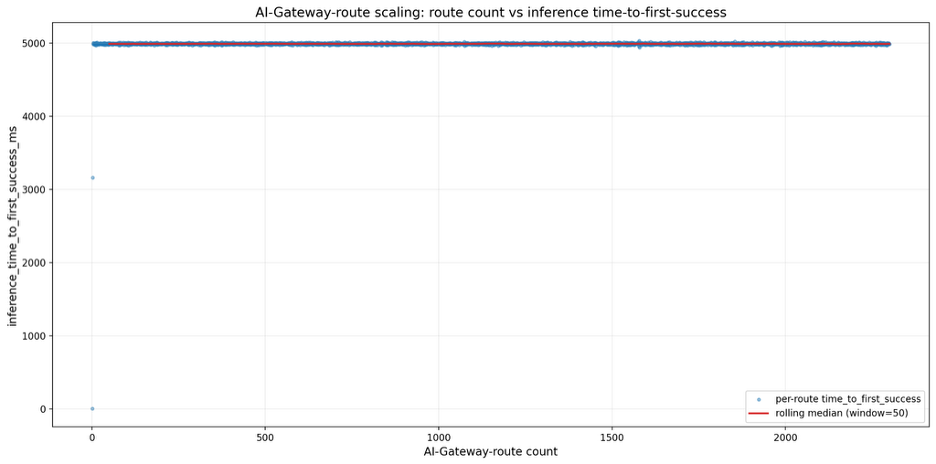
1. Route Readiness Latency (The 5-Second Rule)
I specifically tested how long it takes for a newly created AIGatewayRoute to become "ready" (successfully routing traffic).
- Observation: Across all 2,000 routes, there was a consistent delay of approximately 5 seconds from creation to readiness.
- The "Why": This isn't a performance degradation; it's by design. The extproc server uses a configuration watcher (
filterapi.StartConfigWatcher) that polls for changes at a default interval of 5 seconds to dynamically apply updates without restarting the pod. - Verdict: No degradation in inference performance. Once the route is picked up by the watcher, traffic flows instantly with no added overhead from the scale.
2. Resource Utilization (The Cost of Configuration)
I monitored the key components during the provisioning phase to understand the resource cost of adding thousands of routes.
The "Ramp-Up" Pattern
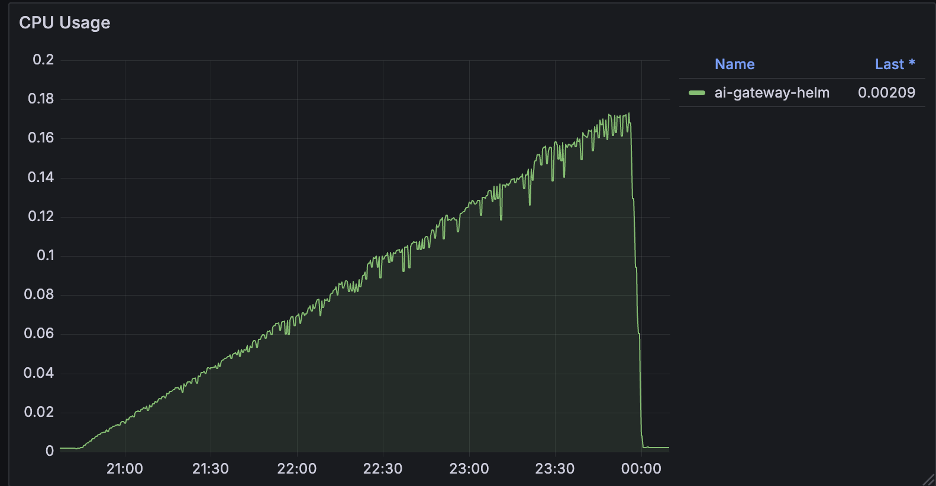
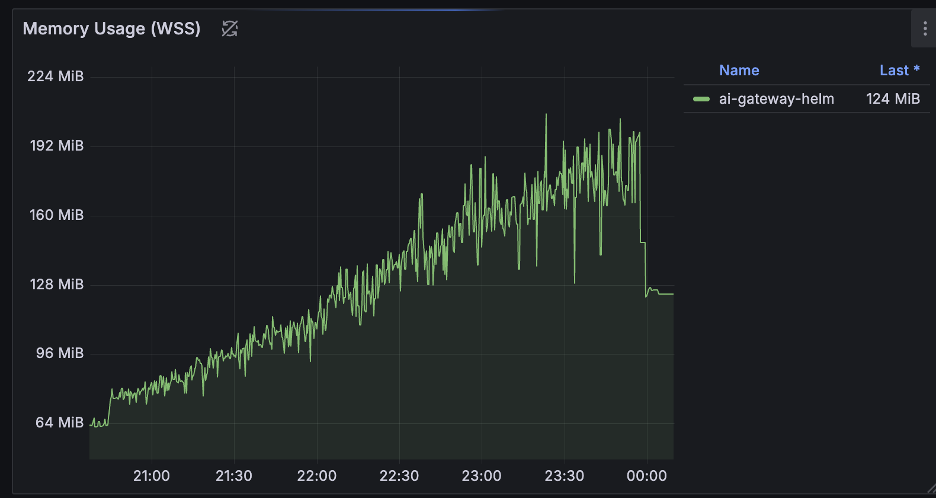
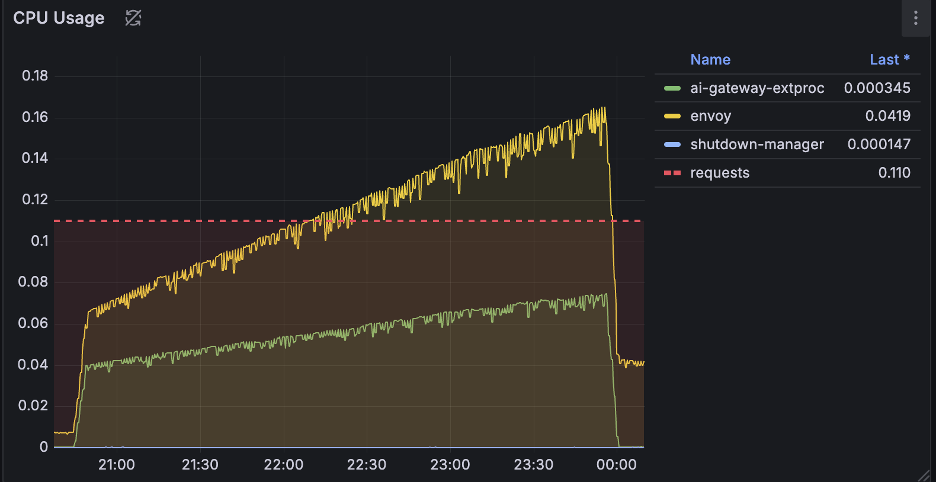
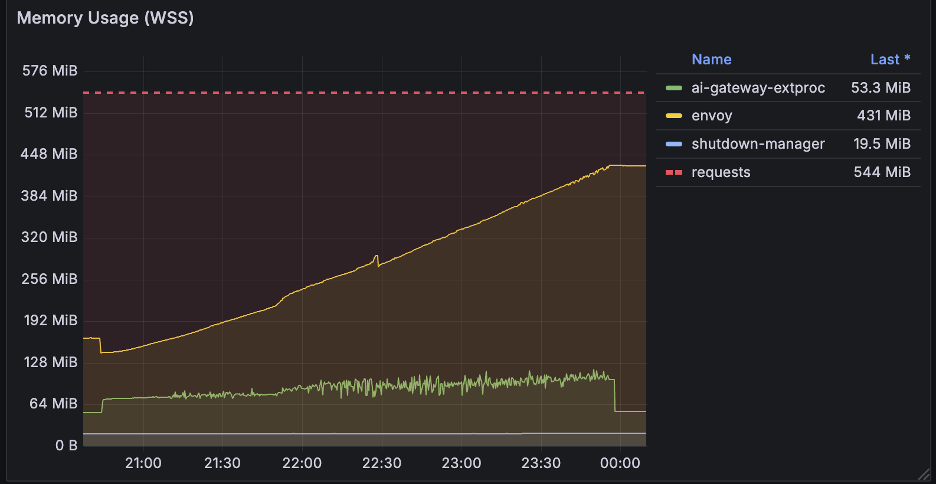
Unlike the flat line of a steady state, resource usage during the provisioning phase tells a different story. As we added routes one by one (up to 2,000), we observed a distinct linear increase in both CPU and Memory usage.
- During Creation: Every new route requires processing, validation, and xDS translation. This cost accumulates linearly — the more routes you have, the more CPU cycles are burned to compute the new configuration snapshot, and more memory is allocated to store the state.
- After Completion:
- CPU: Usage drops sharply back to normal levels once the provisioning script finishes. This confirms that the high CPU load is a transient cost of processing the configuration changes.
- Memory: Usage drops only slightly but remains effectively at the new, higher baseline. This is expected, as the controllers and the proxy must actively hold the 2,000 route objects and their associated xDS configuration in memory to serve traffic.
Envoy Gateway & AI Gateway Controllers
Both controllers exhibited this pattern: a steady, linear climb in resources as the configuration set grew.
Envoy Proxy Pod
The data plane (Envoy Proxy) showed a similar trend. The memory footprint grew as it loaded the expanding configuration, and CPU usage tracked the processing effort required to apply these updates.
Conclusion
Scaling an AI Gateway isn't just about how many tokens per second you can process; it's about how many distinct routing rules you can manage.
We successfully tested Envoy AI Gateway with 2,000 AIGatewayRoutes, and the system performed well across the board — consistent route readiness latency, linear and predictable resource growth, and zero routing failures.
The only tuning required was increasing the gRPC message size from the default 4MB to 25MB to accommodate the larger xDS configuration payloads. With that configuration in place, the gateway handled 2,000 routes without any issues.
Get Involved
Envoy AI Gateway is an open-source, community-driven project, and we'd love your help to continue improving it. Whether it's running your own benchmarks, contributing code, or sharing feedback, there are many ways to get involved:
- Join us on Slack -- Register for Envoy Slack and join the #envoy-ai-gateway channel to connect with the community.
- Attend the Weekly Community Meeting -- We meet every week to discuss roadmap, features, and open issues. Check the meeting notes for the schedule and agenda.
- Contribute on GitHub -- Raise issues, suggest improvements, and submit PRs on the GitHub repository.
- Share Your Experience -- Run your own benchmarks, try the gateway in your environment, and share your results with the community in GitHub Discussions.
We're building this together -- come help us push the boundaries of what an AI Gateway can do.